

CalendarIdea
Agent tasks
An agent task is a job you hand the agent with a schedule. At the times you choose, it does the job on its own and writes the result in a topic. You don’t have to remember to ask.
- The scheduleyour words and when it runs: every Monday at 09:00, say
- A runthe agent does the job on its own, reading what its owner may read
- A topicwritten: a new topic each run, one for each thing found, or one topic kept, which gains a version
- Its pageeach run, with what it made; a run that failed also puts a task in your Inbox
and again at the next run
The job, in your words
Section titled “The job, in your words”You describe the job as you’d ask the agent in a topic, and choose when it runs, what it makes and who sees it. Before the first run, the agent reads your words with the schedule and shows you how it read them. It shows where it will look first, like Jira or Emargen itself, how far back it reads, and who “me” is, when your words say it. Check that it matches what you meant. If it doesn’t, change the words. Name a place to make it look there.
Written up in a topic
Section titled “Written up in a topic”The simplest task writes a new topic each run, named after the task and its day, like “Weekly security news · 26 Oct”. If you named a template, the topic starts from it. The agent reads the previous run’s topic, so it can follow up on open points.
For work that arrives as separate things, like support requests, a task can make a topic for each new thing it finds and put it at the top of one of your lists. It makes up to ten a run. A thing it already made a topic for never gets a second one. When the source says it changed, the task brings that topic up to date instead.
A task can also keep one topic up to date, or add a subtopic each run. You set those up in the topic: see a topic the agent keeps.
The agent remembers what it found. When nothing is new or changed since the last run, it writes nothing and says “Nothing new”. A task that looks at the same open issues every weekday doesn’t write them up again.
A task over time
Section titled “A task over time”Each run is the agent working in the background, on what your organisation has connected and what’s in Emargen. When a run works, nobody gets a notice. Its topic is on the Calendar, on its list and on the task’s own page, which keeps every run. A run that fails puts a task in your Inbox, under To do, with why it failed and Run again. If Emargen couldn’t run a task at its time, it runs once when it can, then keeps to its schedule.
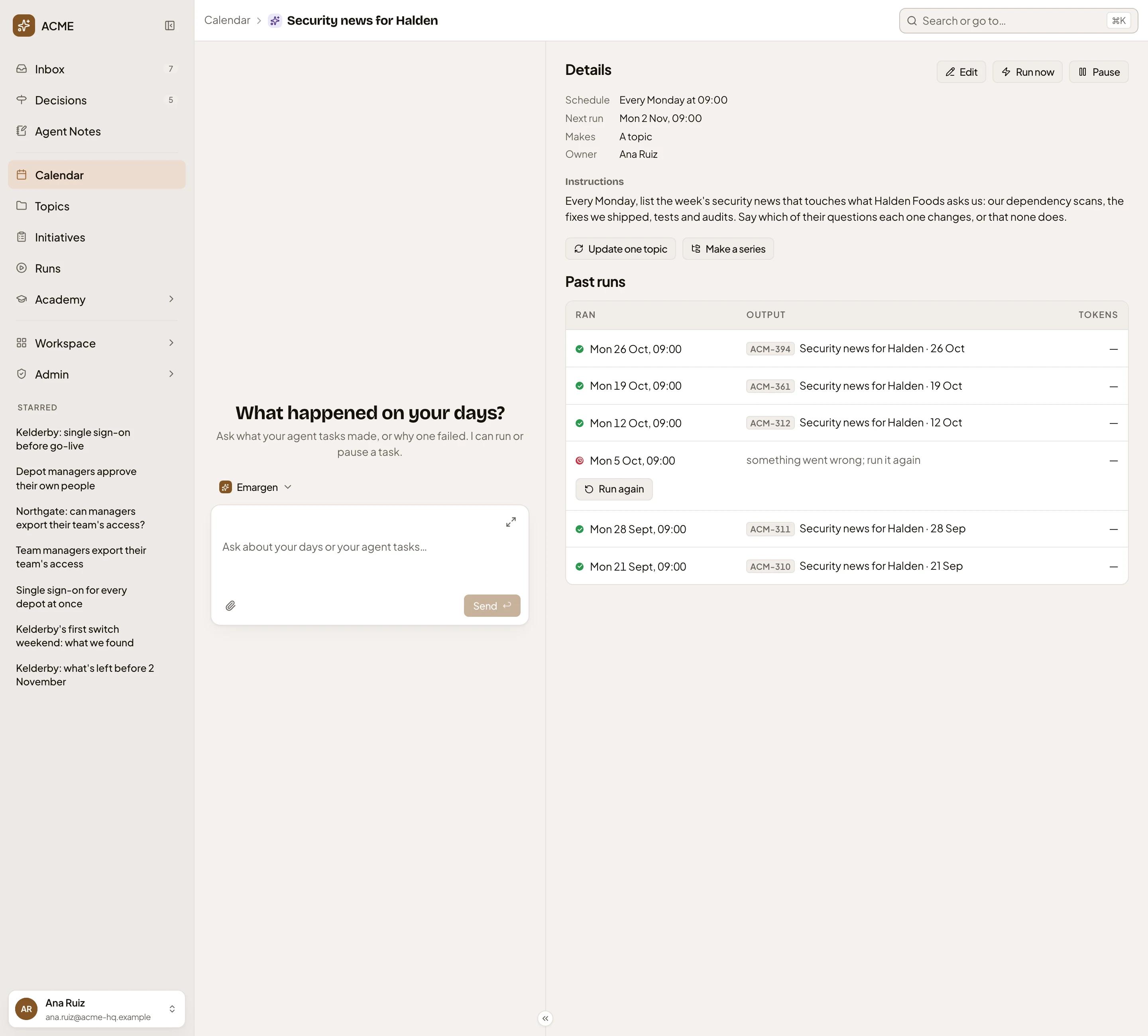
- Schedule, and the next run.
- Instructions. The job, in your words.
- Pause. Keeps its runs and starts no more.
- Update one topic. Has the task update one topic instead.
- A run, and the topic it wrote.
- Run again. A failed run waits here until someone runs it again.
Deleting a task removes its runs, and the topics they made stay.
Jobs people hand over
Section titled “Jobs people hand over”Someone in customer success has the agent write the week’s security news every Monday at 09:00, for a customer with a security questionnaire. When your organisation fixes something the customer asked about, they have the answer ready for their Monday call.
Owned by whoever made it
Section titled “Owned by whoever made it”Anyone can hand the agent a job. The task is theirs, and the agent reads on their behalf, so a run sees only what its owner may see. A task on its own is shared like a topic. One that fills a list, or lives in a topic, is seen by whoever sees that list or topic, and only its owner changes it.
A task isn’t a reminder or a to-do. Nobody ticks it off, and the agent does the work. It needs an AI model, or the run fails and shows why.