

DecisionsPage by page
A decision's page
A decision’s page has one decision and its history, as the topic, initiative or Landscape recorded it. Open it from a mark on the Decision Map, a decision in AI Overview, or one under Decided on a place’s page. It has an address of its own, so you can send it to a colleague.
ACME’s administrator answered a question on the initiative ACM-290 after asking the agent first. A team manager’s export shows only who can open what, without sign-in times.
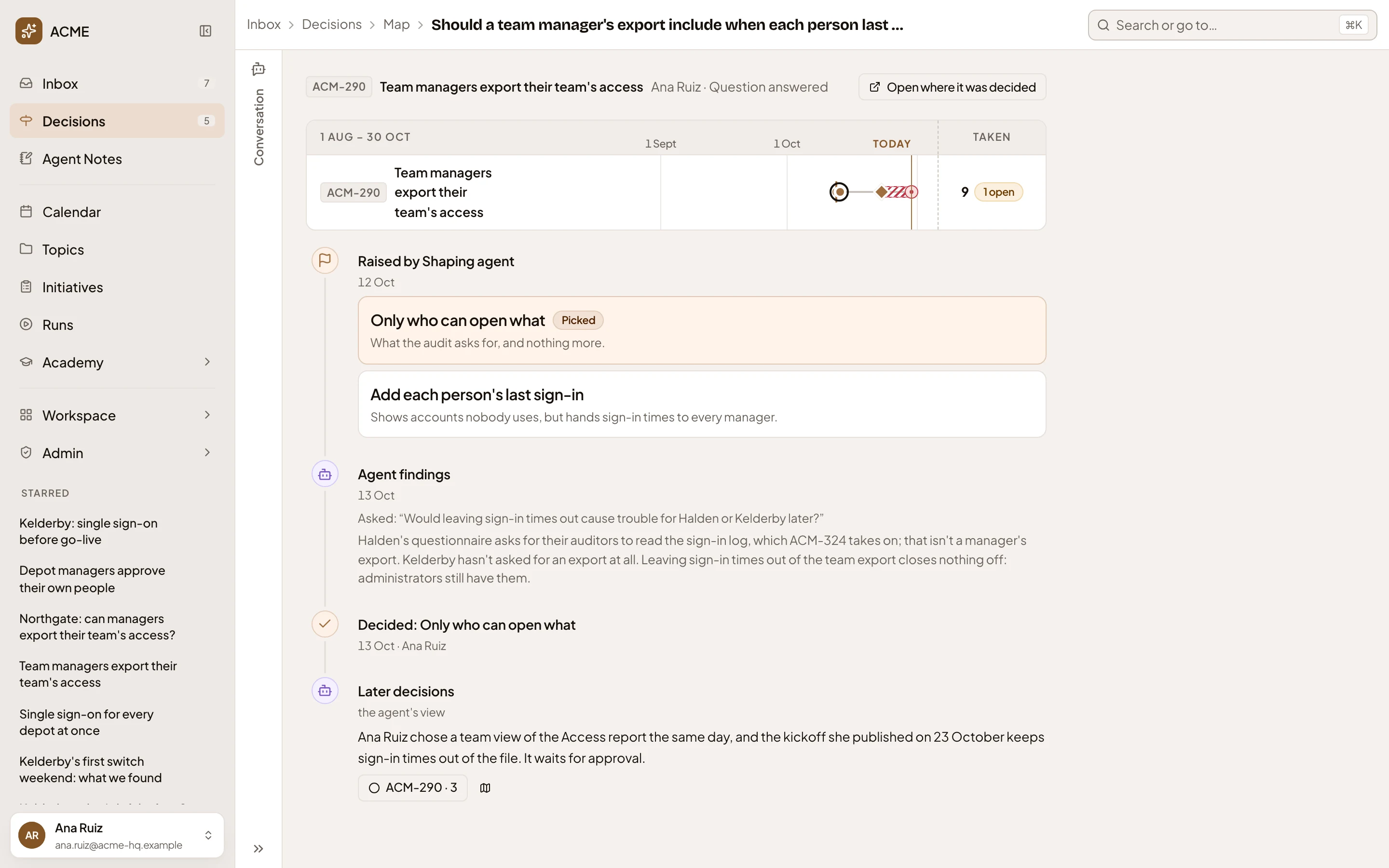
- The place: its key and name, the owner, and the kind of decision.
- Open where it was decided. The topic, initiative or Landscape it belongs to.
- The place’s decisions across the map’s dates, this one ringed. Click a decision taken to open its page, or one still undecided to open it in Decisions.
- Raised: who raised it and when, every option on the table, and what each one meant. Picked marks the option they chose, and Recommended the one the agent put first. When a reason was kept, Recommended opens it.
- Agent findings. What someone asked the agent before deciding, and the answer that came back.
- Decided. Who chose what, and the reason they gave. The date it was decided, and how long it was open.
- Later decisions. Later decisions the agent reads as leaning on, building on or changing it. Each opens its own page.
When the decision’s source records what it changed, that goes under Changes in the history. A decision written as one sentence shows a short question the agent wrote for it, and the page says the agent wrote it.
When the agent reads a later decision as replacing this one, you’ll see Confirm it replaces this under it. Confirming records it for everyone who can open both, and it goes under Confirmed replacements in the history. Withdraw there undoes it.
The path at the top takes you back to the map.
A decision you can’t open says “This decision can’t be opened.”
Access
Section titled “Access”You can open the page of any decision taken in a topic or initiative you can open, or in the Landscape. Only someone who can open both decisions can confirm that one replaces the other, and only the person who confirmed it can take it back.