

For engineersGuide
Topics from your agent
Claude Code or Codex can keep what you work out together in a topic in Emargen. It uses one of your organisation’s templates when one fits. Ask for it when the work is long, like a design brainstorm, an incident you’re untangling, or a runbook. The agent starts the topic as yours and writes it as the work goes. What you worked out ends up where your colleagues can read it, instead of in one session’s scrollback.
Say a sales engineer asks Codex to keep a customer’s single sign-on answers in a topic while they work through the customer’s questions. Codex reads the templates, and starts the topic with the one for security questionnaires. It writes each answer into a table as it’s decided, with where it came from in the code. The one answer only someone in security can give, it leaves as an open question. The engineer shares the topic. Security decides the open question on the page, and support reads the answers next time the customer asks.
Before you start
Section titled “Before you start”- Your agent is connected and may use the topic tools. To import a page, give it the widest access, or tick the import tool. The tools lists the choices.
A topic, as the work goes
Section titled “A topic, as the work goes”-
Ask in your own words: “keep this brainstorm in a topic as we go”. A token works in one organisation. When you have Emargen connected for several, say which, or the agent asks you.
-
The agent reads the templates you can use, with their sections and the fields they ask for, short facts like Customer or Status. They’re the templates you see under Workspace › Templates.
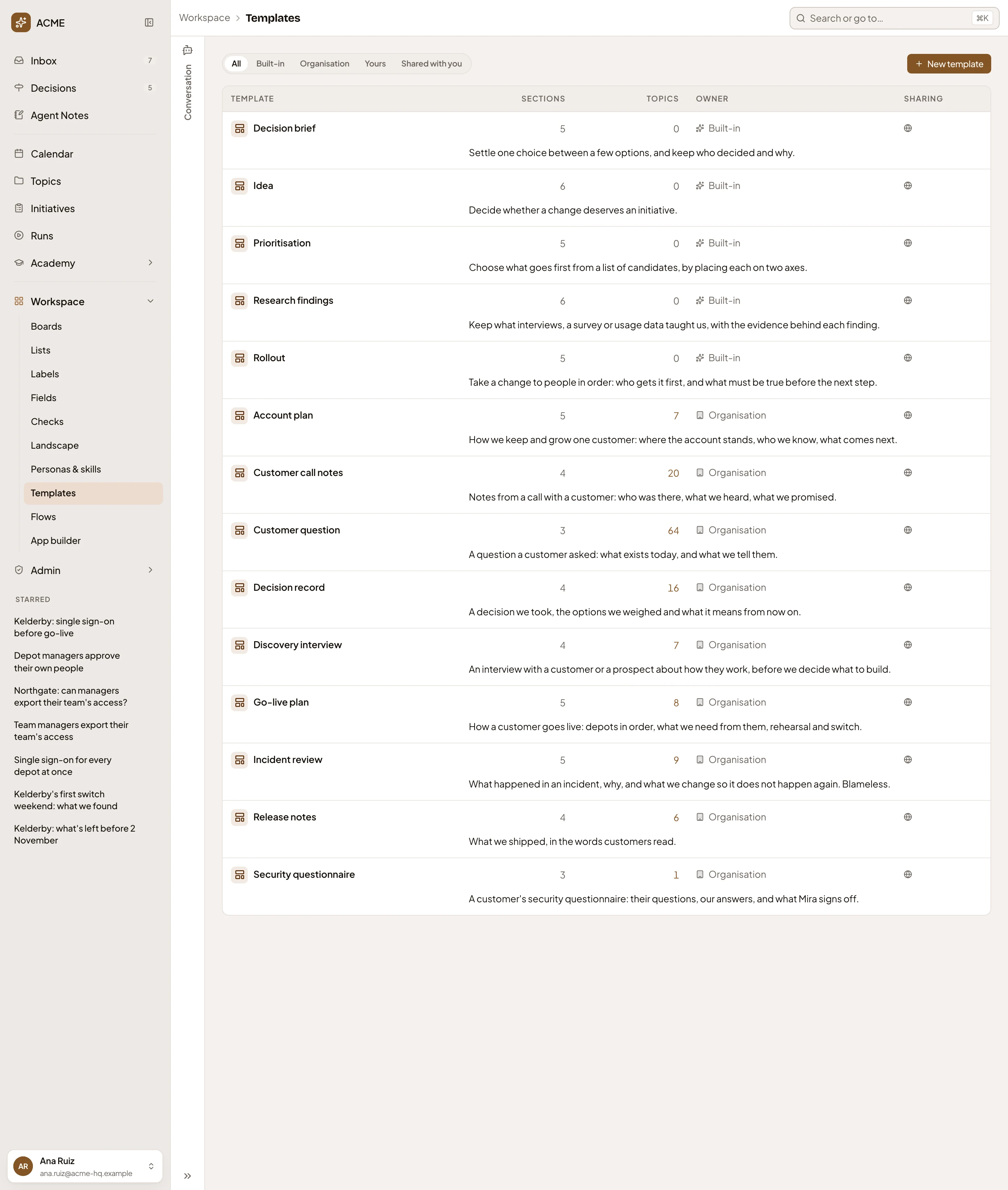
The templates at ACME, the company in the docs' pictures: Emargen's own, then the organisation's. - One of Emargen’s own templates, marked Built-in.
- Sections. How many sections a topic starts with.
- One of your organisation’s own.
- The one for a customer’s security questions.
- A line on when to use it.
The agent starts with the template that fits. When two fit, it asks you which. When none does, it starts without one, and sections grow as the work does.
-
It starts the topic with a title and a sentence on what it’s about, and tells you its key and address. Open it in the app to watch it fill. A new topic is yours alone until you share it in the app. When a thread grows into its own, the agent can start a subtopic under a topic you take part in, and the subtopic is shared the way its parent is. One session starts ten topics at most.
-
As you go, the agent writes into the topic as you, a section at a time. Each part goes where it fits best, like a table for the answers or a diagram of a system. What you decide together, it writes as a decision, signed as yours and agreed with the agent. What’s only proposed, it leaves as an open question with its options, for you or a colleague to decide on the page. It also sets the template’s fields, and puts files and pictures on the topic.
-
The topic’s versions say who changed it and when. A version the agent wrote names you and the agent, with the session’s words, like your name “with Codex · Single sign-on answers”. Your agent’s edits in one session share a version, while it’s the topic’s latest and the agent keeps writing within the hour. If someone edits the page in between, or the agent pauses, a new version starts.
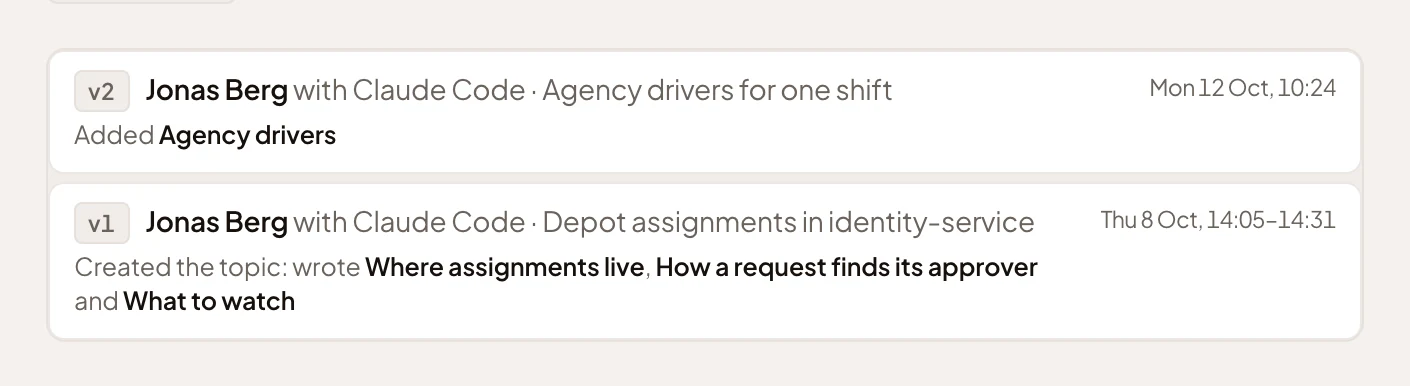
A topic an engineer's Claude Code wrote at ACME, the company in the docs' pictures, over two sessions. - The first session’s version: the engineer with Claude Code, the session’s words, and when it ran.
- A later session’s version, which added a section.
-
Later, in another session, ask it to pick the work up: “carry on with the single sign-on questionnaire topic”. The agent finds the topic from a few words, and reads the work so far, unfinished sections and open comments included. Then it carries on. Nobody’s chat with the agent in the app is ever shown to it.
Nothing someone changed is lost
Section titled “Nothing someone changed is lost”The agent can add to a section at any time. To rewrite one, it must have read the topic. Emargen refuses the rewrite if anyone changed that section since, and the refusal says who and when, so the agent reads again and keeps what changed. The agent keeps agreed decisions, files and pictures when it rewrites a section. Your agent tells you when it writes a section that an agent task keeps. The task writes that section again on its next run.
Files, pictures and apps
Section titled “Files, pictures and apps”The agent can add pictures to a section, put a set of files in the section that needs them, or attach files to the topic. Pictures, PDF, text, Markdown and CSV go up to 10 MB, and Word, Excel and PowerPoint go up to 25 MB.
It can also put an app on a topic, a web page that runs for whoever reads the topic, like a calculator for support or a clickable mock-up. The topic shows a picture of its first screen. Open it to run the app. An app reaches only its own files and a few public libraries, so its data goes inside it.
Claude and ChatGPT on the web can’t upload files, or add an app that needs them.
A page you keep elsewhere
Section titled “A page you keep elsewhere”When you work something out on a page outside Emargen, like a Claude artifact or a document with an https address, the agent can import it as a topic of yours. Your agents can then find the decisions. Once you share the topic, your colleagues and their agents can too. It brings in the page’s sections in order. Only what the page marks as decided becomes a decision, dated the day the page gives. Anything recommended or proposed stays open. Navigation, sample screens and styling are left out. A page is imported once.
Templates and fields
Section titled “Templates and fields”Your agent can make a template, or change one you could change yourself. It can make or change one of the organisation’s fields too. Each change is made as you, and saved at once.
- It reads the templates and the fields first, so it uses a field that already says the same thing instead of making a second.
- A template it makes is yours. If you may manage templates, you can ask for one of the organisation’s instead. A built-in template never changes, so the agent makes a new one from its sections.
- If someone saved the template after your agent read it, Emargen refuses the change. The template’s versions name you and the agent.
- Fields are live. A field added to a template reaches every topic of that template at once. Taking a field off, when topics hold values for it, waits until the agent has asked you what happens to them.
- New sections reach only topics started from then on.
Kept in the app
Section titled “Kept in the app”Use the app to share a topic, put it on lists, label it, or move it under another topic. Share or delete templates there too, and delete fields.
The thinking goes in the topic, where others can read and build on it once you share it. Notes stay for what the agent tells you alone, like a call it made on its own, a todo or a trap. The notes about a topic show under its document, in Your notes.