

DecisionsPage by page
A place's page
A place’s page shows one initiative, topic or the Landscape as Decisions sees it. It holds what’s still to decide there, what was decided before, and the agent’s reading of it. Open it with a group’s name in Decisions, or a place’s name on the Decision Map. Its address ends in the place’s key, like /decisions/ACM-290.
In the picture, ACME’s administrator has the initiative ACM-290 open. Someone has to approve the kickoff, and one question was decided.
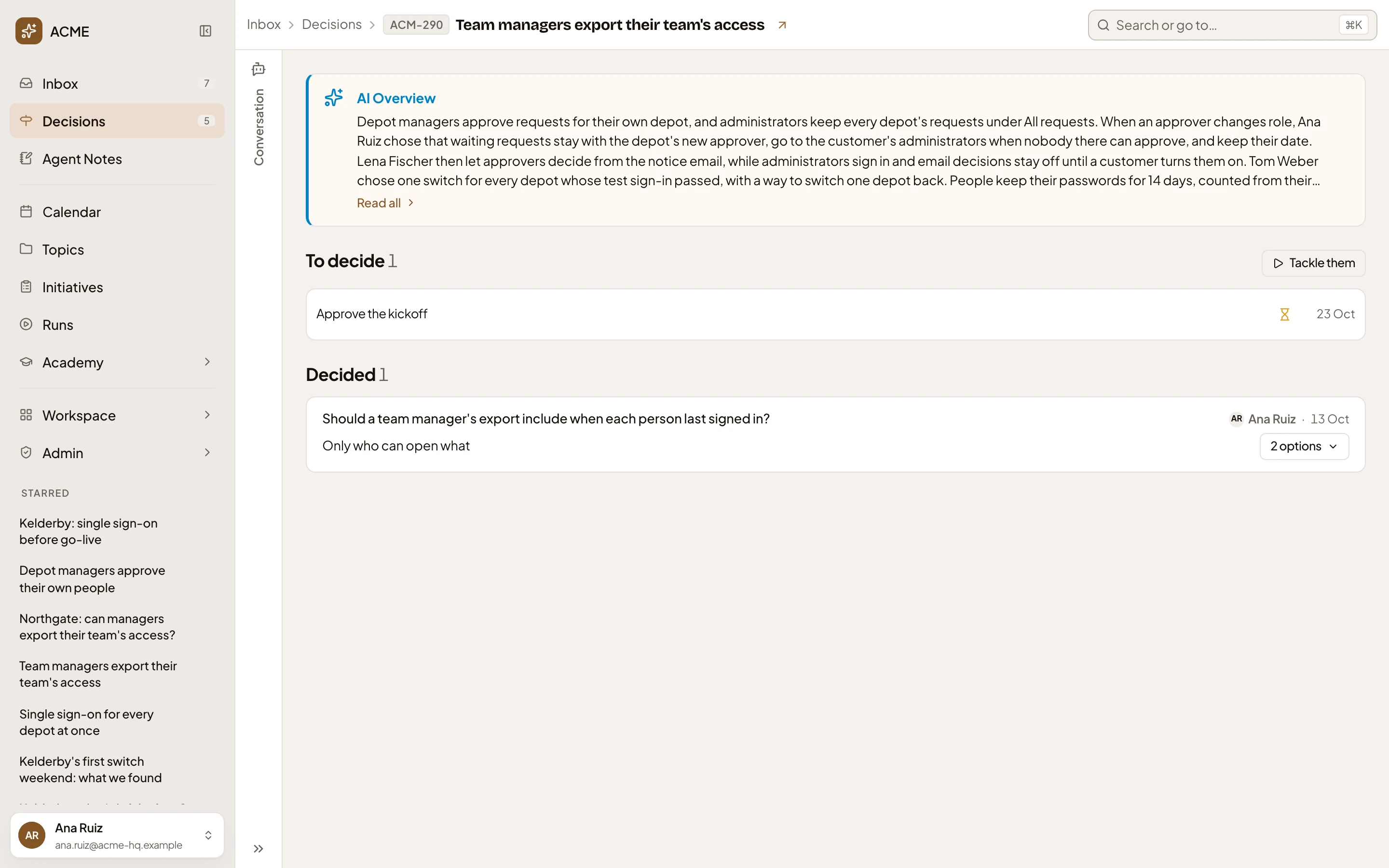
- The path shows where you are. The arrow after the place’s name opens the initiative or topic.
- Conversation. Your chat with the agent, the same one as in the Inbox.
- AI Overview. The agent sums up what was decided here over the year when you open the page. The summary stays until a decision here changes.
- Read all. Opens this place’s full AI Overview.
- To decide. The decisions open here that you can see, yours first. Click a row to open its card on the right, as in Decisions. With nothing open, the section isn’t there.
- Tackle them. This place’s items, one at a time.
- Decided. What was decided here, newest first: the question, who decided and when, then the answer.
- The options that decision had. Click to list them, with the one picked.
Click a decision’s question to open its own page, with its trail. Decided lists twenty, then Show more.
Decided shows answered questions, choices in topics, change requests and Landscape changes. It leaves out an initiative’s kickoff, its published versions, the approach chosen and requirement levels, and answers to the agent’s questions in a chat. The Decision Map still shows all of these.
When a decision was written as one sentence, the agent adds a short question above it. Point at the question to see that the agent wrote it. One that was set aside says Set aside. A decision replaced by a later one is struck through, with Replaced to open the newer one.
The Landscape, checklists and approvals
Section titled “The Landscape, checklists and approvals”Three places have no key:
- Landscape, at
/decisions/landscape. What was decided about your organisation’s words, with its AI Overview. The arrow after its name opens the proposals waiting in the Landscape. - Checklist, at
/decisions/checklists, for the checklists you run with the agent. - Initiative approvals, at
/decisions/approvals: every kickoff waiting for approval. A row is its initiative.
Initiative approvals and Checklist only show what’s open. With nothing open, they say “Nothing waits on you here.” Each kickoff also shows on its initiative’s page. A Landscape proposal or a checklist step waiting on you doesn’t show on these pages. You find it in Decisions, under Mine.
A place where nothing was decided yet says “Nothing has been decided here yet.” under Decided. A key that names no initiative or topic you can open says “This place can’t be opened.”
On a phone
Section titled “On a phone”The chat and the page take turns, as on Decisions.
Access
Section titled “Access”You see a place’s page for any initiative or topic you can open, and the Landscape. To decide lists the open decisions you can see there. You can act on the ones that are your turn. Decided and AI Overview read only what you can open.