

TopicsIdea
Subtopics
A subtopic is a topic that sits under another topic. It’s a topic of its own, with its own key, chats, document and versions.
Big work comes in parts. A customer sends a security questionnaire of 40 questions, and the three about single sign-on need a closer look than the rest. The sales engineer asks the agent to pull those answers into a topic of their own. The questionnaire stays readable as a whole, and the people who know sign-on work on those answers in conversations of their own.
A section, or a subtopic
Section titled “A section, or a subtopic”A section is part of one piece of work, and the next reader reads it with the rest. A subtopic is a part you’ll keep working on apart from the rest. It has its own conversations and decisions, a document that keeps growing, and sometimes its own people.
The sign-on answers became a subtopic because the next sign-on question will need them, and not the rest of the questionnaire. The reply to the customer stayed a section of the questionnaire.
Making one
Section titled “Making one”Ask the agent. It starts the subtopic and writes it for you, or moves sections you’ve already written into it. You can also start one yourself from the topic’s menu, or turn a section into one, comments and all. A link stays where the section was.
An agent task can add a subtopic on each of its runs, for a series like a weekly update that people read and share one week at a time.
The topic above lists its subtopics, and each subtopic’s path leads back up. A subtopic can have subtopics of its own.
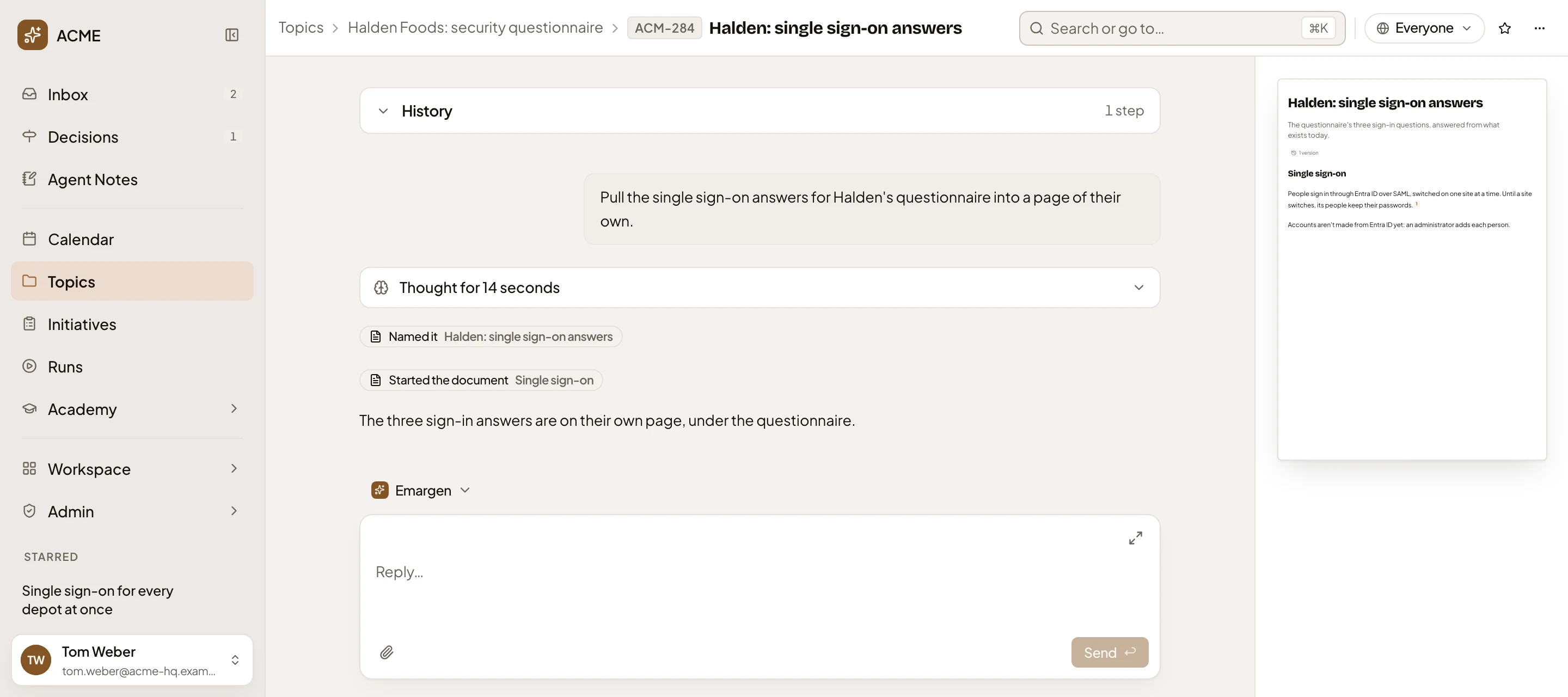
- The path: the topic above, Halden Foods: security questionnaire, then the subtopic’s own key and title.
- Sharing: who sees the subtopic, here everyone.
- The request that made the subtopic.
- Named it and Started the document: the agent gave it a title and its first section.
- The subtopic’s own document, beside the chat.
Sharing follows the topic above
Section titled “Sharing follows the topic above”Whoever sees the topic above sees the subtopic, and the subtopic keeps following it. Share the questionnaire with someone, and they see the sign-on answers too. In the subtopic’s Sharing, its owner can switch that off and choose its own sharing.
Anyone who takes part in a topic can add a subtopic to it. Only the owner can move a topic under another one, or back on its own. When a move changes who sees it, the dialog names who will see it and who won’t any more, before anything moves.