

AdminPage by page
Connections
Connections lists the systems Emargen searches and agents may use, such as your ticket tracker or your wiki. Below them is every kind of system you could still connect. Open Admin in the menu, then Connections. See Connections and knowledge.
Open Connections (opens Emargen in a new tab)ACME has two connections. Jira Cloud holds its tickets and Confluence Cloud its wiki.
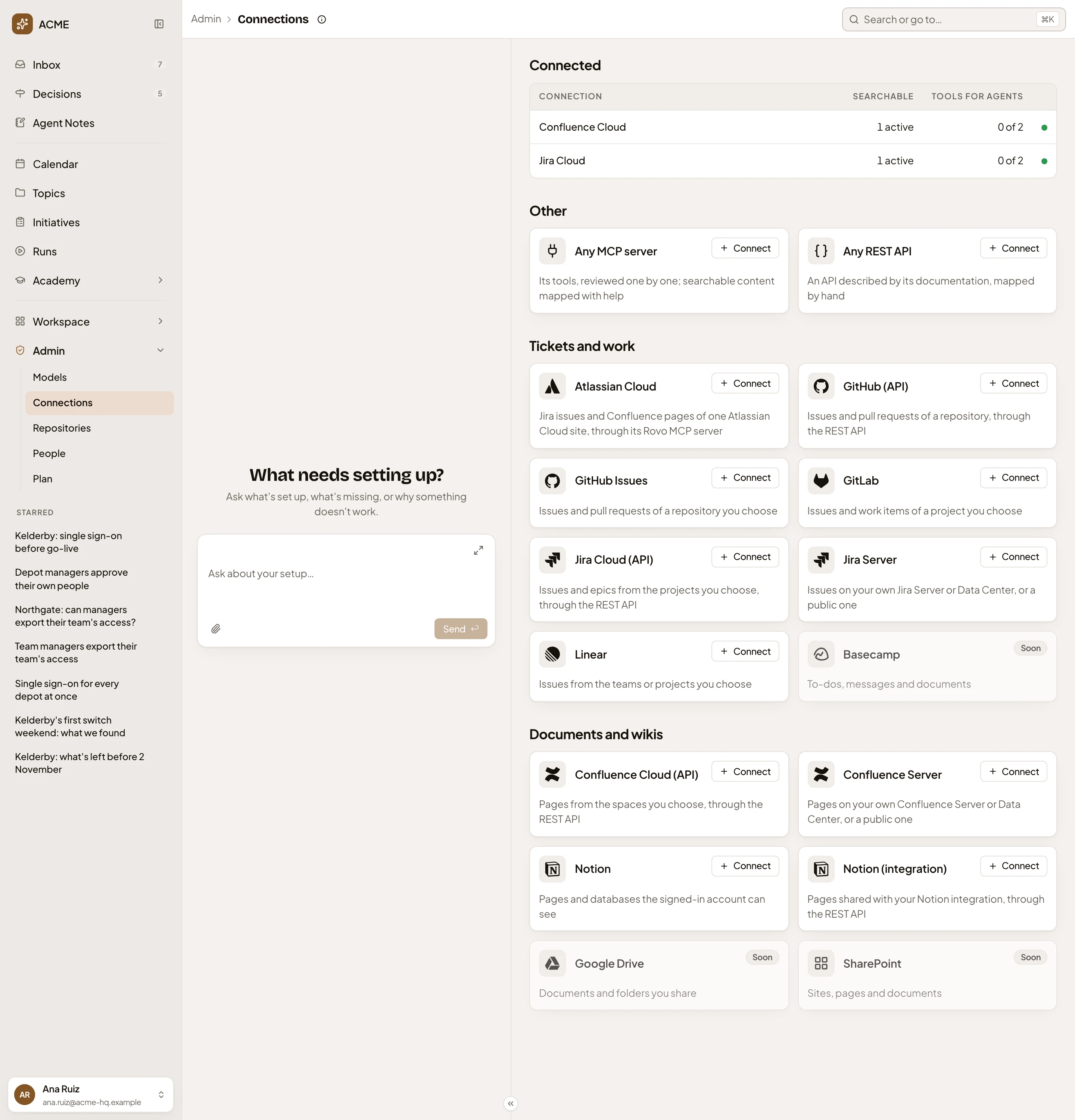
- Connections guide. What each part of the page does.
- A connection. Click its row to open its page.
- Searchable. How many of its searchable contents are active. Failed and switched-off contents count with the drafts. Only active ones are searched.
- Tools for agents. How many of its tools agents may call, out of all it has. A REST API always shows 0, since its tools only serve search.
- The status. A green dot when it’s active, a grey one when it’s switched off. A warning mark when it needs its sign-in again, a red one when it couldn’t be reached. Point at it to read it.
- Other. For a system no kit covers. Any MCP server opens a form you fill in yourself, and Any REST API a short page for its address and a token.
- Connect. Asks for what that kind of system needs. See A new connection.
- Soon. A kind of system Emargen can’t connect yet. Its card has no Connect.
The cards below Other are kits, grouped under Tickets and work and Documents and wikis. A kit’s card says what becomes searchable. Atlassian Cloud connects the Jira and Confluence of one site at once, with a sign-in in the browser.
The chat on the left is the admin agent’s, as on every Admin page. Ask it what’s set up, or why a connection doesn’t work. See Admin.
With nothing connected, there’s no Connected table and the page starts with the catalogue. While an organisation is being set up, the page first asks where the team’s knowledge lives. With no tool to connect, answer “Nowhere yet”. You can still launch.
On a phone
Section titled “On a phone”The page and the admin agent’s chat take turns on the screen. See Admin.
Access
Section titled “Access”Everyone in the organisation can open Connections, and anyone can connect a system. They can change the connections they connected. Changing someone else’s needs the permission to manage connections, which administrators have. See roles and permissions.