

WorkspaceIdea
Fields
A field records one fact about a topic, such as its customer. It might be the customer a question came from, where the answer stands, or the day it’s due. You see the facts that matter without reading every document.
A topic’s kind is its template, and the template says which fields its topics have.
Facts out of the prose
Section titled “Facts out of the prose”You can’t count a fact buried in prose. A support lead needs to see which questions wait on the customer. Written into each document, that fact can’t be counted, filtered or grouped. A spreadsheet kept beside the documents is only as current as its last edit.
A field takes one fact out of the text and gives it a name and a value. It sits at the top of each topic, can show on its card, and works in the conditions of boards and lists.
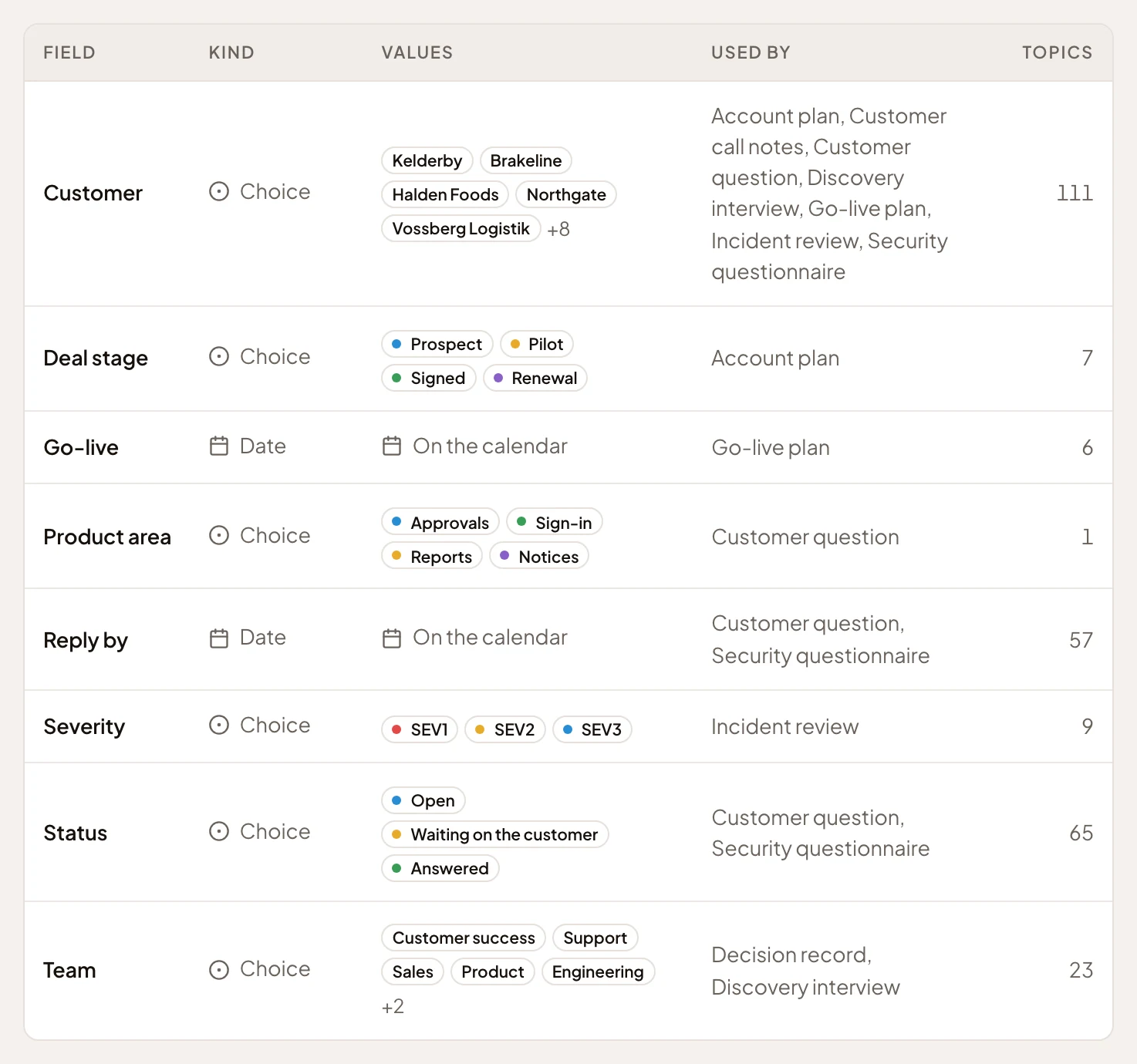
- Choice. The field’s kind, what it holds.
- The templates that carry it. Every topic of those templates has it.
- How many topics hold a value.
- On the calendar. A date field that puts its topics on the calendar.
- A choice field’s values, in order, each with its colour.
A name, a kind and a meaning
Section titled “A name, a kind and a meaning”A field’s kind says what it holds, like a day or a choice from a list of values. Its meaning is a sentence or two, like “Where our answer stands.” People read the meaning when they pick a value. The agent reads it to choose one.
A choice field’s values come in order, each with an optional meaning and a colour. Some are marked Done, like Answered or Fixed, and boards fold those at the end. A day field can put its topics on the calendar, so the day each customer needs an answer shows there without anyone adding it.
The agent fills them
Section titled “The agent fills them”The agent fills fields from the conversation and from what it reads. When a support lead’s agent task makes a topic from a support request, the agent sets its Customer, and its Reply by when the request names a date. It picks only values that exist, and leaves a field empty when nothing makes it clear. It leaves a value you set alone unless you ask. The exception is a field an agent task keeps up to date. Each run sets it again from its source.
Emargen doesn’t sync with Jira or any other tool.
On a template
Section titled “On a template”Fields belong to your organisation, and you choose which ones each template carries, up to ten. Every topic of that template has them. Add Severity to a bug report template, and every bug report shows it. The topic a run of a flow writes carries the flow’s fields too. A topic with neither has none.
Every field is a filter: a list can keep every topic whose Status is Waiting on the customer. A choice or person field can also group a board, so each customer is a column.
A customer’s name can be a label or a field, and they do different jobs. The label gathers everything about the customer, topics and initiatives alike. The field gives each customer question exactly one customer, which a board can turn into columns.
You can make a field and add it to a template you may change. Its maker and administrators can change it, since a change reaches every topic that has it. Only administrators delete one.