

Area of Emargen
Decisions
Decisions holds what’s waiting on you to decide. A choice the agent left open in a topic. A question a coding agent asked while it builds, which stops its work until you answer. A plan that can’t start until someone approves it. You decide each one where you read it.
We built it so you can decide without hunting for the page, and move things on when you can’t decide yet.
Work stops where nobody is looking
Section titled “Work stops where nobody is looking”People wait on you in many places at once, and often you’re the last to hear. A choice sits in a topic you haven’t opened this week. An approval sits on a page you were never sent. Without one list, you’d visit every topic and initiative to find what’s yours, and the work would wait while you looked.
Decisions gathers them. You can see which items hold work up, like “Delivery can’t start without it”, and the count beside Decisions in the menu says how many are yours to move now. Nothing is copied. Each item is read from where it lives, so deciding here is the same as deciding there.
Only decisions
Section titled “Only decisions”What lands here is something to choose, answer or approve. Most of it comes from topics and initiatives, like a requirement’s level, a change request against an approved plan, or a kickoff to approve. New words for the Landscape come here for approval too. So do the steps of a checklist or a flow that wait for you.
A comment that tags you, a todo, and a question the agent asked in your own chat aren’t here. They wait on a reply or a task, and they sit in the Inbox, under To reply and To do.
Each topic, each initiative and the Landscape also has a page of its own in Decisions. It shows what’s still to decide there and what was decided before, with an AI Overview at the top.
Deciding on the card
Section titled “Deciding on the card”You decide an item where you read it. Its card holds the choice, with the option the agent recommends marked, and a line for why you chose, which stays with the decision.
When an item takes words rather than a pick, like a coding agent’s question, the agent drafts a Suggested answer from what the initiative or topic says, and names what it drew on. You change it or write your own. Nothing goes until you press, and every action has an Undo for a few seconds.
To clear a morning’s worth in one sitting, Tackle them brings your items up one at a time, with a key for each choice.
Ask the agent first
Section titled “Ask the agent first”Some decisions need one more fact. With Ask agent, you tell the agent what you need to know. The item’s own agent, the topic’s or the initiative’s, works on it in the background, in your own chat of that topic or initiative. The item leaves your list until it’s back, so nothing nags you while you wait.
Its response comes back on a page of its own, with your question, the findings and their sources, and the agent’s recommendation with its reason. It doesn’t decide. You do, and its response stays with your decision.
We kept this out of the chat. An answer there would stay in the chat, and the next person would never see why you chose.
When you can’t decide yet at all, Postpone puts an item off until tomorrow, Monday, a week, or until you bring it back. Hand over makes it a colleague’s turn.
A question, start to finish
Section titled “A question, start to finish”Someone in customer success has a question waiting on an initiative for a customer’s export: should a team manager’s export say when each person last signed in? Sign-in times are personal data. They wonder whether leaving them out would cause trouble with two other customers later, so they ask the agent.
A while later the item is back. The agent found that one customer’s questionnaire asks for auditors to read the sign-in log. Another initiative already covers that. The other customer hasn’t asked for an export at all. Leaving sign-in times out closes nothing off. They pick that option and move on, and what the agent found stays with the decision.
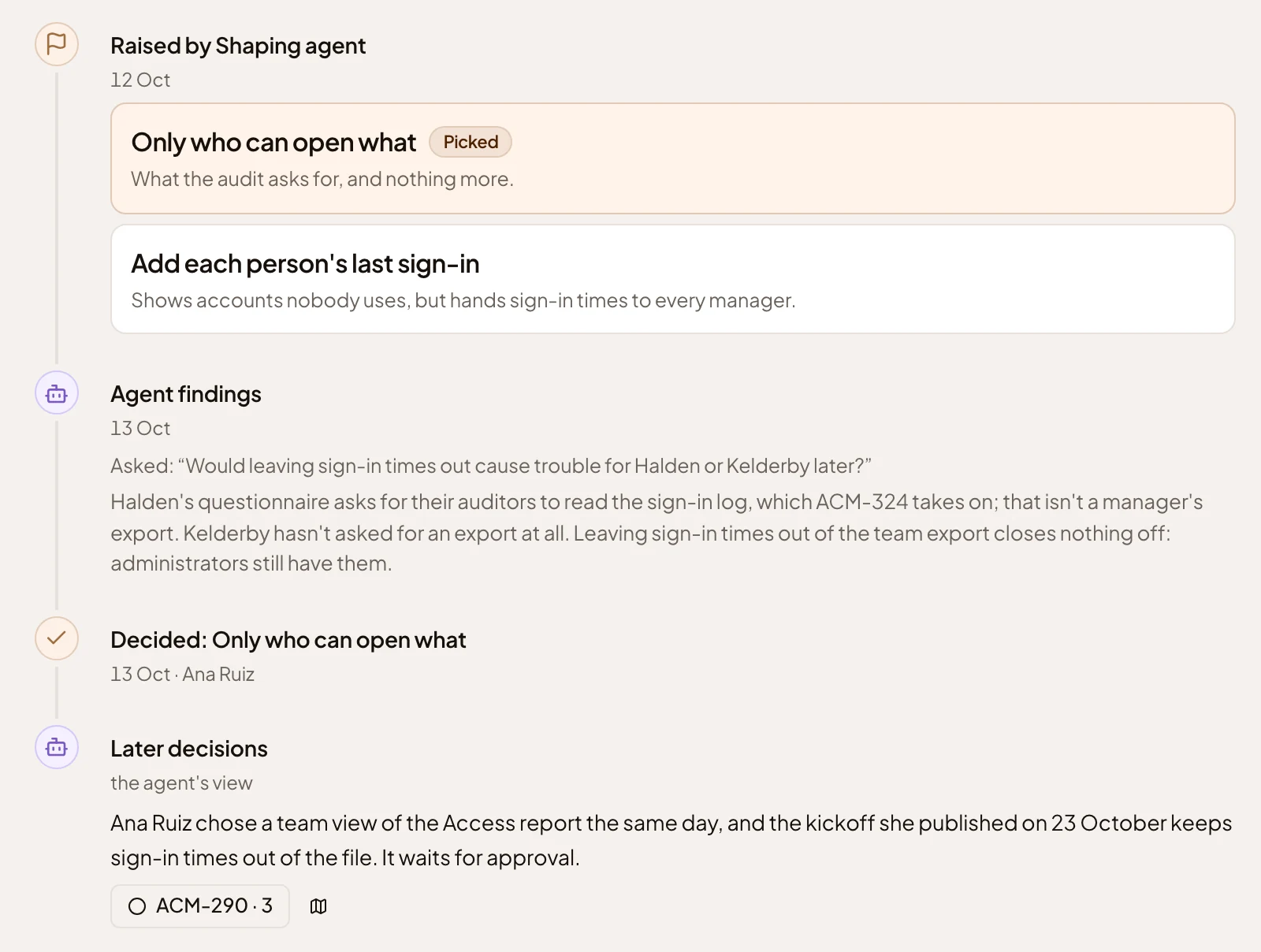
- The options it was raised with. Picked marks the one chosen.
- Agent findings. What you asked, and what the agent found.
- Who decided, and when.
- Later decisions. The agent’s reading of the decisions that build on this one.
The record
Section titled “The record”Decisions has a second page, the Decision Map. It’s the record of what people decided, drawn in lanes over time, with what’s still open today. Each decision has a page with its trail: who raised it, the options, who chose and why. AI Overview has the agent tell you what they add up to, every sentence citing the decisions it rests on. Weeks later, someone in support can read what was promised to a customer before a call, without asking anyone.
Beside the rest
Section titled “Beside the rest”- Topics and initiatives raise most of what lands here, and get the answer back when you decide it.
- The Inbox holds what waits on a reply or a todo. The chat beside Decisions is the Inbox’s. It reads your list with you and can lay out what each option would mean, but it decides nothing.
- A Landscape proposal reaches the people who may approve Landscape changes. A kickoff reaches the people who may approve initiatives.